Skip to content

TRY IT NOW · NO SIGN-UP

Plan B2B events in a single sentence.

Pick each detail below. Bloomod writes the page, the invites and every follow-up.

We’re hosting on , from to , at .

Tap a highlighted word to change it · free on Seed, no card

PREVIEWUpdating live
Data Engineering Summit
  • 17:00 – 19:00 PST
  • Moscone Center, San Francisco
  • Guests RSVP in one tap
ADMIT ONENOV 202626Thursday
INVITES LAND INGoogle CalendarOutlookMicrosoft 365Apple CalendarGoogle MeetMicrosoft Teams

WHAT BLOOMOD DOES

Bloomod runs the communication around your B2B event. It puts the invite on their calendar, tracks every RSVP, and sends the right message to each guest, before the day and long after it.

01

Gets people there

Your invite lands on their calendar, not in a pile of emails. Every reply is tracked, guest by guest.

02

Keeps them informed

Briefings and reminders go out on time, matched to how each guest replied.

03

Brings them back

Follow-ups, subscribe forms and announcements turn one event into an audience you keep.

HOW BLOOMOD WORKS

One event. Four moments that matter.

Bloomod handles each one on time, so you can focus on the room.

EVENTEvent dayThu 26 Nov

01 · INVITE

Straight onto their calendar.

Bloomod sends a real calendar invitation to Google and Outlook. Guests reply Going, Maybe or No in one tap, and you see every answer as it comes in.

  • No .ics downloads
  • No guest accounts
  • Every RSVP tracked
CALENDAR INVITATIONGoogle Calendar · OutlookData Engineering SummitThursday, 26 November · 17:00 – 19:00 PSTMoscone Center, San FranciscoOrganizer · Your companyGoing?YesMaybeNo

MEET DRAFT IT

Fill in the blanks. Draft it does the rest.

One short script, five choices. No blank page and no typos: every blank is picked from a list made for B2B tech events. Draft it turns your script into a complete event.

YOUR SCRIPT

DRAFT IT CREATES

EVENT PAGE
bloomod.com/e/data-engineering-summitRegistration open
CALENDAR INVITE
Thu 26 Nov · 17:00–19:00Google Calendar and Outlook
REGISTRATION FORM
Name, work email, companyReady to use, editable
MESSAGE SCHEDULE
Brief 24 · Remind 25 · Follow up 27 NovSent automatically
VENUE AND TIME ZONE
San Francisco · PST (UTC-08:00)Map and directions on the page
  • Pick, don’t type

    Event titles come from a list made for B2B tech events, so there’s nothing to misspell or guess.

  • Real venues

    Search places as you would in Google Maps, or choose Google Meet, Zoom or Teams.

  • 24-hour times

    Start and end times in 30-minute steps, in your time zone. No AM or PM mix-ups.

  • Change anything later

    Your draft is a real event page. Rename it, add details and publish when it’s right.

Edit your script ↑

BRIEFINGS, MADE SIMPLE

Plan your Briefing in one sentence.

Choose who receives it and when. See exactly where your Briefing fits before event day.

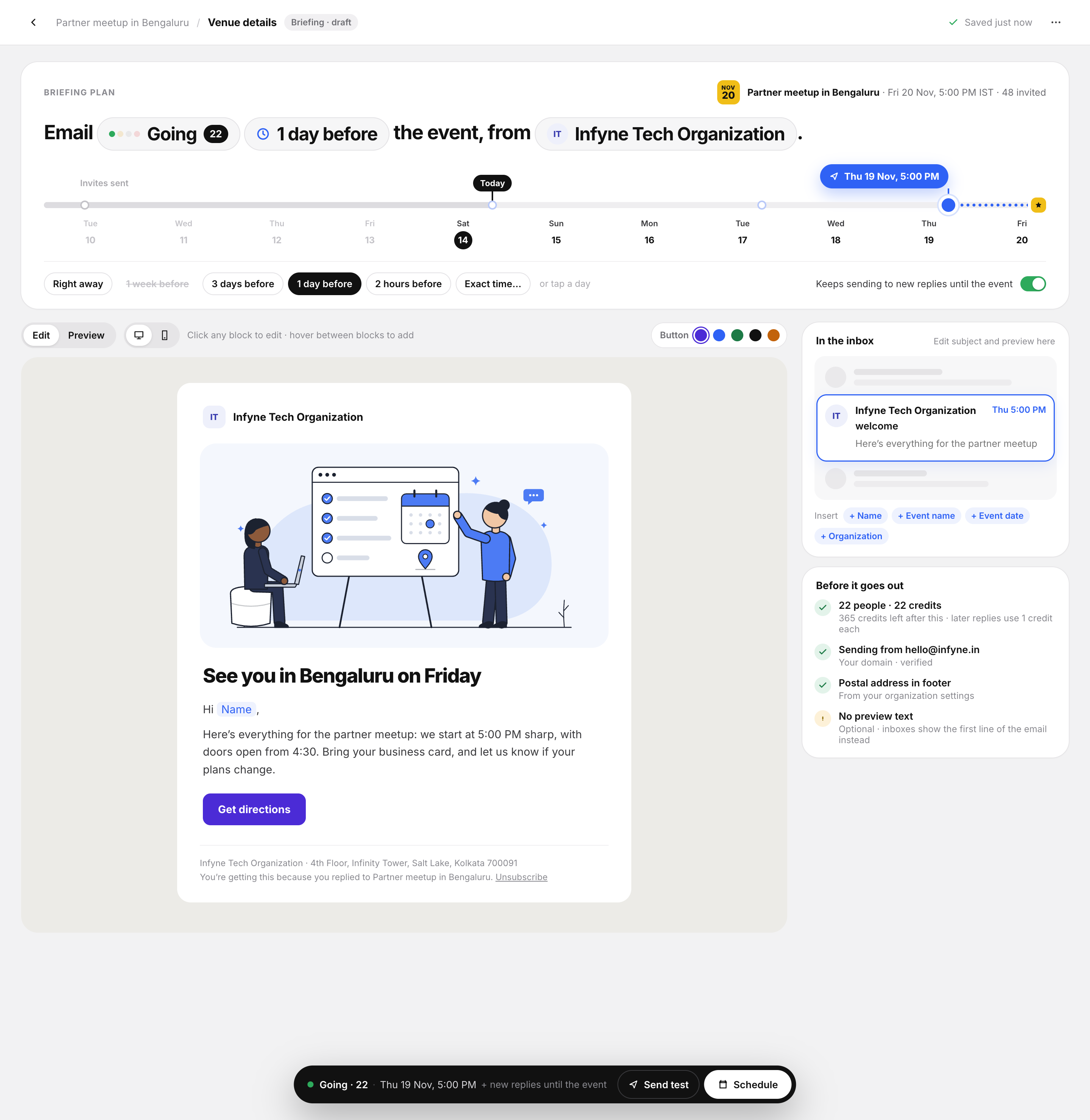
Bloomod Briefing plan: email 22 Going guests one day before the event. The timeline places the send on Thursday 19 November at 5 PM, before Friday’s event.

YOUR AUDIENCE + TIMING

Email Going guests one day before the event.

YOUR SEND, BEFORE EVENT DAY

Timeline showing the scheduled send on Thursday at 5 PM, followed by the event on Friday.
A Briefing plan in Bloomod · example eventView full composer ↗
  1. Choose your audience

    Select the guests you want to reach by their RSVP.

  2. Pick your timing

    Choose a time before your event or set an exact send time.

  3. See your scheduled send

    Review the date on the timeline before you schedule.

FOR YOUR GUESTS

Nothing to install. Nothing to sign up for.

Your guests get a normal calendar invite and reply in one tap. Then they get only the emails that match their answer.

  • Works in Google Calendar and Outlook
  • No .ics files, no guest accounts
  • One-click unsubscribe in every email

Every bloom starts as a seed.

Compare plans →
LIMITED OFFER

Origin 83% off

Everything in Petal for 12 months.

  • 50,000 Email Credits for the 12 months
  • Unlimited events, guests and subscribers
  • 1 sender domain of your own
  • 1:1 mailbox · no Bloomod branding · own SMTP
  • Dedicated bulk sending queue and RSVP reporting
  • Extra credits at Petal prices

After 12 months, you move to Seed (free) or choose any plan.

$70once, for 12 months

A year of Petal is $420 83% off a year of Petal

Claim Origin · $70One per organization · paid once · no renewalAlready on Bloomod? Claim it in Billing →

Seed

$0forever

500 email credits a month. 5 active events · Up to 1,000 guests per event · Up to 1,000 subscribers · Sends from a Bloomod address.

Start free

Stem

$15/ month, billed yearly

5,000 email credits a month. 10 active events · Up to 2,000 guests per event · Up to 5,000 subscribers · 1 sender domain of your own.

Choose Stem

Petal

For weekly events
$35/ month, billed yearly

20,000 email credits a month. Unlimited active events · Unlimited guests per event · Unlimited subscribers · 3 sender domains of your own.

Choose Petal

Bloom

Custom

Your own credit volume and limits, negotiated credit pricing and onboarding with our team.

Talk to us

Every plan includes event pages with registration, calendar invites, RSVP tracking, briefings, reminders and follow-ups. One email to one person is one credit; RSVPs are free. Prices in USD, before tax; monthly billing is also available.

Before you start.

Still curious? Talk to us →

What is Bloomod?

Bloomod connects registration, calendar invites, RSVP briefings and follow-ups for B2B events, so every guest gets the right message from invite to the room.

How does Draft it work?

Fill in a short script: pick an event title, a date, a start and end time, and a venue or meeting link. Draft it builds the event page, calendar invite and message schedule. Check it, then publish. Nothing is sent to anyone until you publish from your account.

Does every event get its own registration form?

Yes. You set up the registration form while you create the event, so each event has its own questions and its own sign-up link. There is no separate form to build or plan limit to track.

Do guests need to download anything?

No. Calendar invitations land straight in Google Calendar or Outlook, with no .ics file to download and no guest account to create.

What does an RSVP tell me?

An RSVP shows what a guest intends to do: Going, Maybe or Not going. It is not a record of who actually attended. RSVPs never use credits.

Guests or Subscribers?

Guests are people invited to or registered for an event. Subscribers joined your list through your subscribe form, so you can announce future events to them.

Can I send invites in bulk?

Yes, on every plan, including free Seed. Send calendar invites and announcements to your whole list at once, one credit per email. Petal adds a dedicated bulk sending queue for large, recurring sends, and bulk credit packs go up to 50,000 credits.

How do email credits work?

One email to one person uses one credit: invites, reminders, briefings, follow-ups, announcements and newsletters. RSVPs, registrations and page visits use none. Seed includes 500 credits a month for free; Stem includes 5,000 and Petal 20,000.

Plant your
first event.

Seed is free forever · 500 Email Credits a month · no card